Controls, settings and known bugs
The game runs on PC, Mac, phones, tablets, Xbox and PlayStation; Roblox’s own page for it lists all six. Most keys can be changed in Settings, and a Controls switch there picks the PC, console or mobile layout. Below are the defaults on each, and the fixes players have found for the bugs that come up most.
Cannot find the game?
On Roblox it is called Slayers 2, by Ouw Productions. In launch week, searching the old name, Project Slayers 2, did not bring it up, and at least nine players asked where it had gone under the first guides. A logged-out search now puts it first for both names, but if yours does not, search Slayers 2.
One result to skip: a place called [RELEASE] Project Slayers 2. Its group looks like Ouw Productions, but the O is a Greek letter, and its description asks you to pay for early access. The real one, and how it was renamed, is on the release date page.
PC keys
RunLeft Shift
Toggle run is its own switch above the list
Shift lockLeft Alt
DashQ + WASD
From the HUD hint; not a row in the list
Tool 1 to Tool 51 to 5
Skill 1 (block)F
Skill 2 to Skill 5Z, X, C, V
Skill 6 to Skill 8B, N, K
Skill 9 and Skill 10L, J
Emote wheelE
Rebindable since V0.18
Pick up, study, talkT
The prompt key on screen
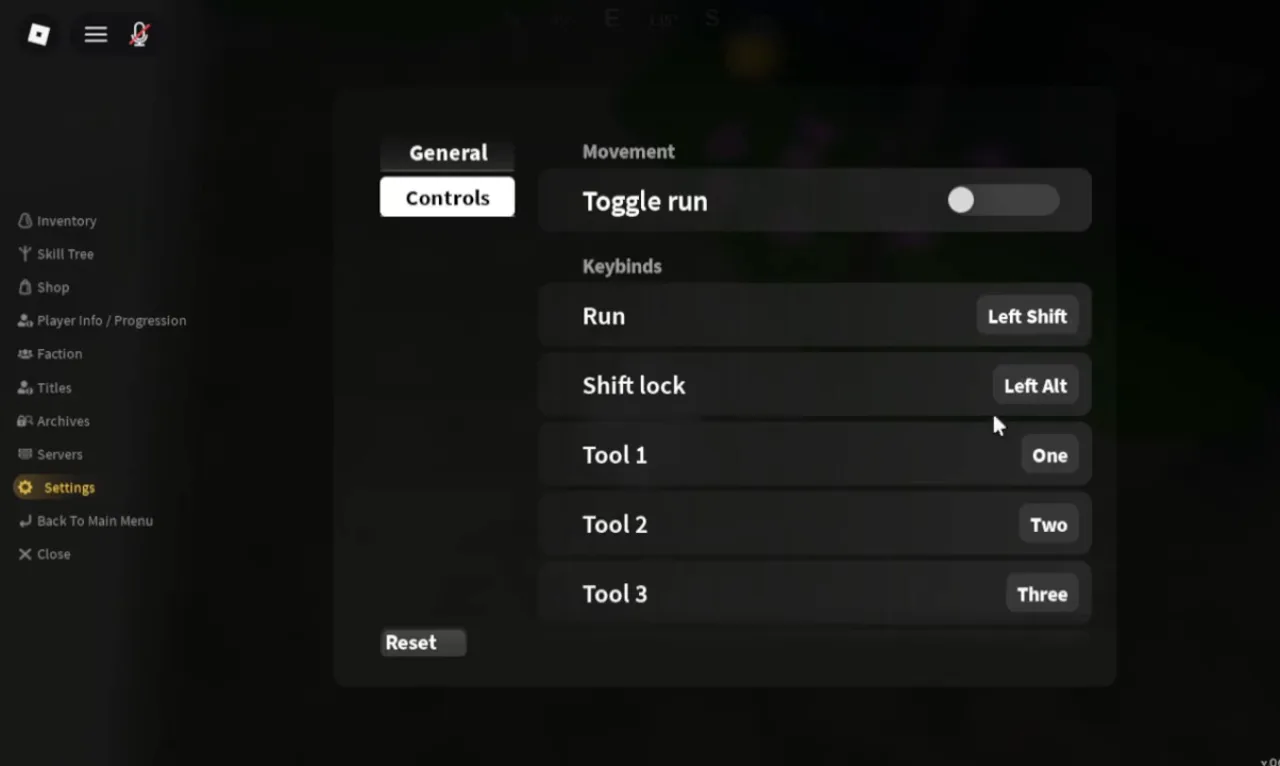
Controls: Toggle run off; Run Left Shift, Shift lock Left Alt, Tool 1 to Tool 3 on One, Two, Three.
Frame at 0:51 of How to Change Settings in Slayers 2 Roblox, recorded by VendoPlus — a player’s video, not an official image
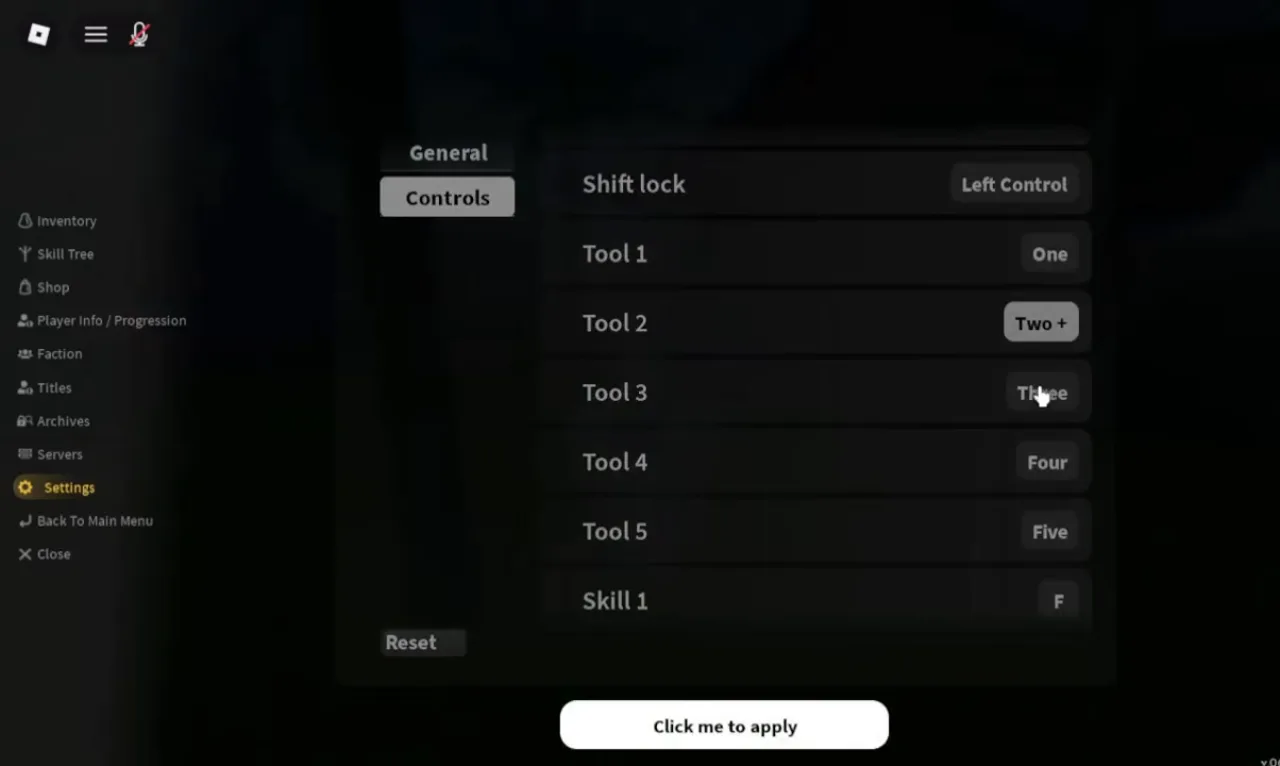
Tool 2 waiting for a new key (Two +), Shift lock already moved to Left Control, Skill 1 on F, and Click me to apply.
Frame at 0:42 of How to Change Keybinds in Slayers 2 Roblox, recorded by VendoPlus — a player’s video, not an official image
To change a key, open the menu (the three-line button at the top left), go to Settings, then Controls. Click a key, press the new one, and hit Click me to apply. Skill 1 is your block, which the V0.18 notes confirm when they fix blocking after Skill 1 is moved off F.
Before V0.18, E opened the emote wheel and could not be moved, so players without the 600 Robux Emotes pass got a purchase prompt every time they pressed it. The emote wheel now has its own key, still E by default, and E and R can be used for other things. The pass itself is on the game passes page.
No Slayers 2 screen shows the M1, heavy attack or jump keys. Some key tables online list right-click for a heavy attack; that line matches the first Project Slayers’ description, and no Slayers 2 screen shows it.
The settings that matter
Controls sits at the top of the General tab: Auto picks the layout from your device, or force PC, Console or Mobile. Under it are Effects, Screen shake and Map materials, and on the mobile screen from a few days later, Boss bar and Stat chips switches as well.
V0.18 added more: separate Effects sliders for your own effects, your party’s and everyone else’s, a Shadows toggle for performance, and an option to hide the control hints. Nobody has filmed the new rows yet, so their exact labels are unknown.
There is no render distance setting in any Slayers 2 settings screen we have seen. For lag, VendoPlus uses Roblox’s own menu instead: Graphics Mode on Manual, a low Graphics Quality, and a frame rate cap.
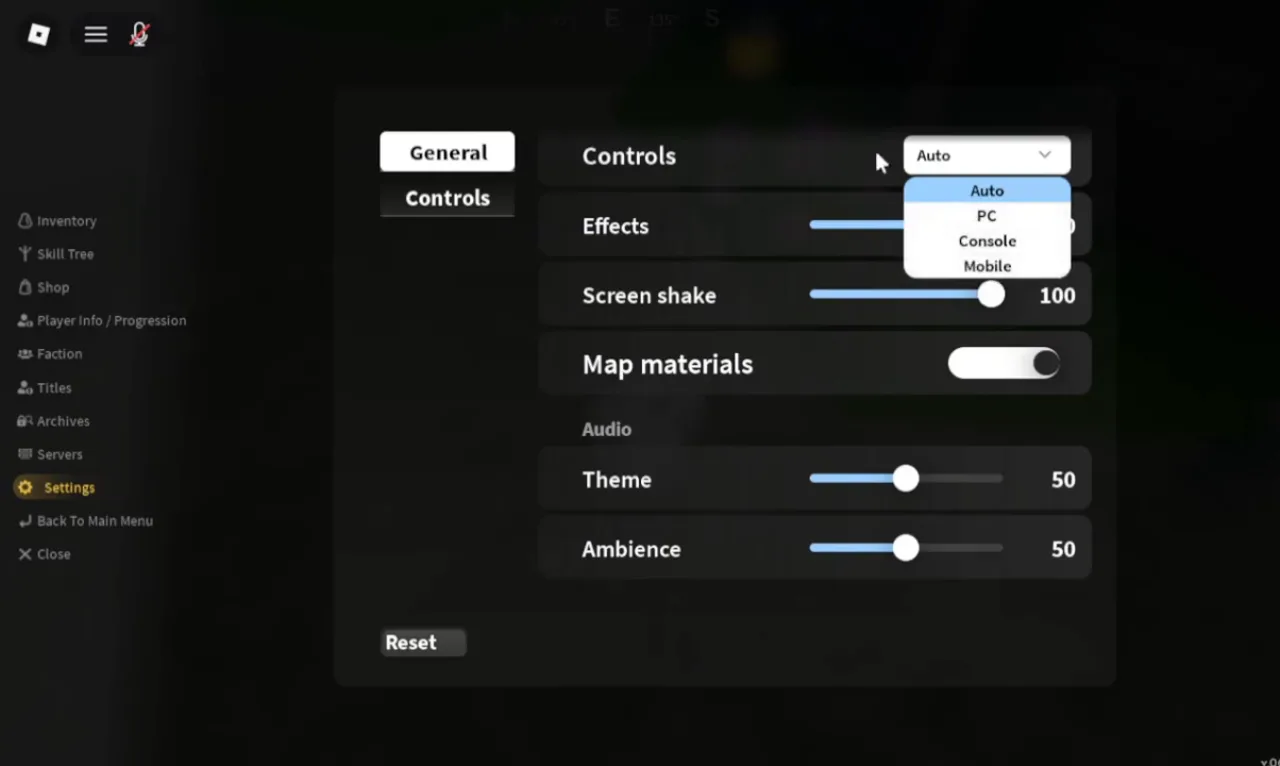
General: Controls open on Auto, PC, Console, Mobile; Screen shake 100, Map materials on, Theme and Ambience 50. PC, first week.
Frame at 0:32 of How to Change Settings in Slayers 2 Roblox, recorded by VendoPlus — a player’s video, not an official image
Shift lock
The switch in Roblox’s own menu is greyed out with Set by Developer, so use the game’s key: Left Alt by default. If Alt also fires your screenshot tool, move it to another key; VendoPlus uses Left Control.
LiftedTIO notes that the game puts you in shift lock during a fight whether you like it or not; console and mobile have a Strict shift lock switch too. On a phone, the game’s description says the shift lock toggle is in the top right corner.
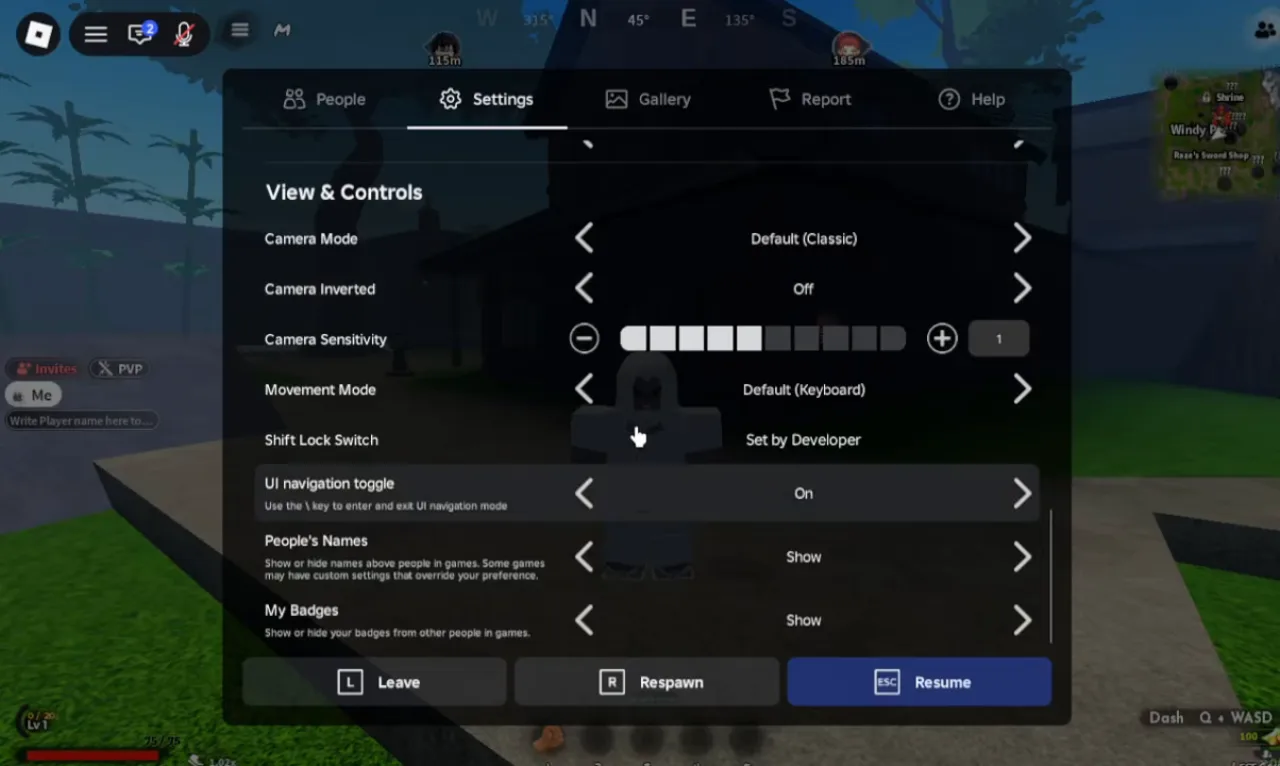
Roblox's menu, not the game's: Shift Lock Switch reads Set by Developer. The HUD hint bottom right reads Dash Q + WASD.
Frame at 0:25 of How to Shift Lock in Slayers 2 Roblox, recorded by VendoPlus — a player’s video, not an official image
Controller
These are PlayStation buttons from LiftedTIO’s console guide; on Xbox, presumably take the button in the same position: Square is X, Triangle Y, Circle B and Cross A. Rows marked as one player’s word come from his narration.
| Action | Button | Source |
|---|---|---|
| Run | L2 | on screen |
| Skill 1 (block) | Square | on screen |
| Skill 2 | Triangle | on screen |
| Skill 3 | Circle | on screen |
| Skill 4 to Skill 6 | L1 + Square, Triangle, Circle | on screen |
| Skill 7 to Skill 10 | D-pad directions, Skill 10 with L1 | one player's word |
| Next hotbar slot / previous | R1 / L1 + R1 | on screen |
| Dash | L3 (press the left stick) | one player's word |
| M1 attack | R2 | one player's word |
| Jump | Cross | one player's word |
| Menu | D-pad up | one player's word |
| Map | D-pad down | one player's word |
| Emote wheel | Hold D-pad left | one player's word |
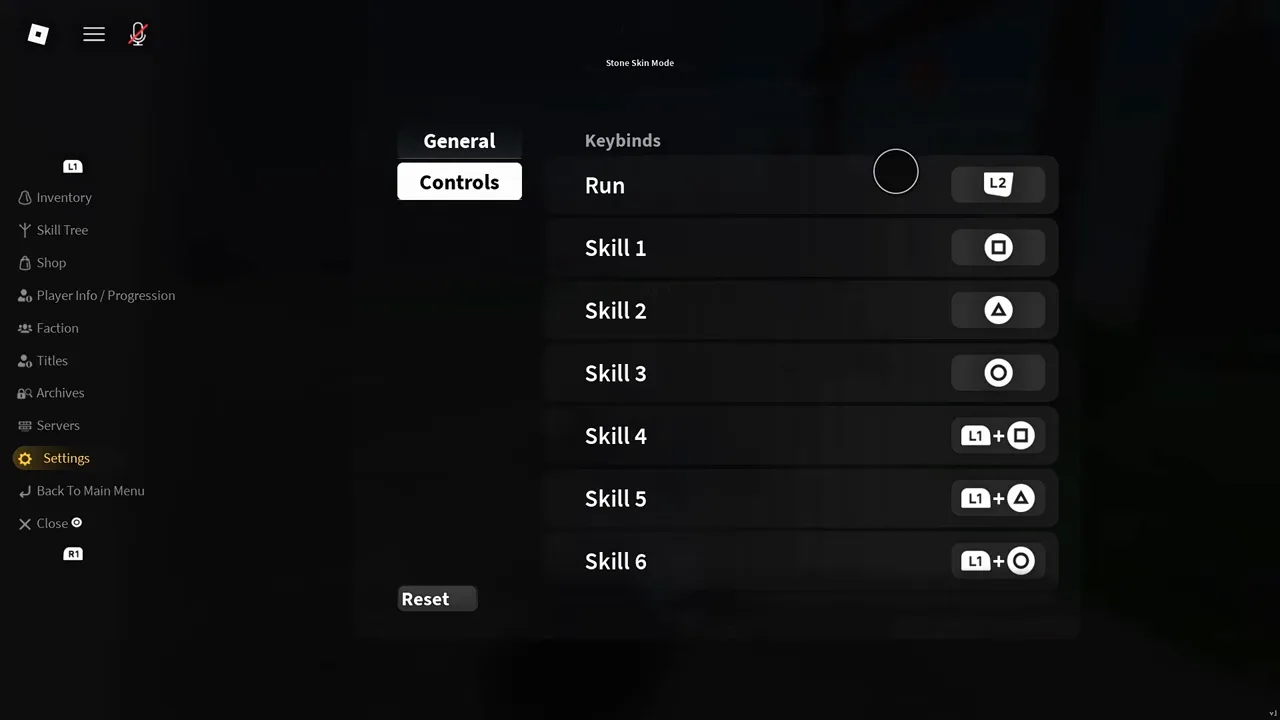
The controller defaults: Run on L2, Skill 1 Square, Skill 2 Triangle, Skill 3 Circle, Skill 4 to Skill 6 L1 plus the same three.
Frame at 3:30 of IN-DEPTH CONSOLE SUPPORT GUIDE and important tips and settings to change in PROJECT SLAYERS 2, recorded by LiftedTIO — a player’s video, not an official image
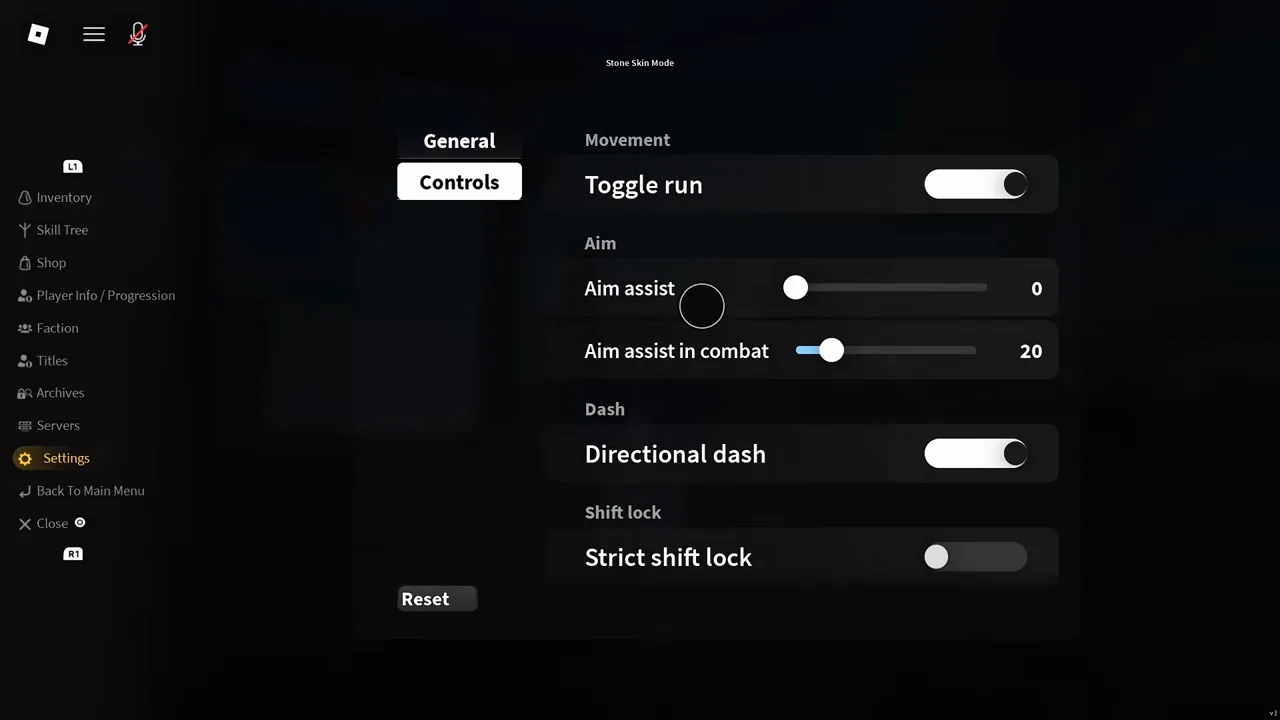
On console: Toggle run on, Aim assist 0, Aim assist in combat 20, Directional dash on, Strict shift lock off.
Frame at 1:15 of IN-DEPTH CONSOLE SUPPORT GUIDE and important tips and settings to change in PROJECT SLAYERS 2, recorded by LiftedTIO — a player’s video, not an official image
If your dash only goes forward, switch on Directional dash. LiftedTIO also turns Aim assist to 0 because it jumps to targets you are not fighting, while the mobile player Madness keeps it on.
Two console limits he reports: combination binds like L1 + Square cannot be created, and the default Skill 8 on D-pad down also opens the map. Colours in the character customiser cannot be changed with a controller; do that part on a phone.
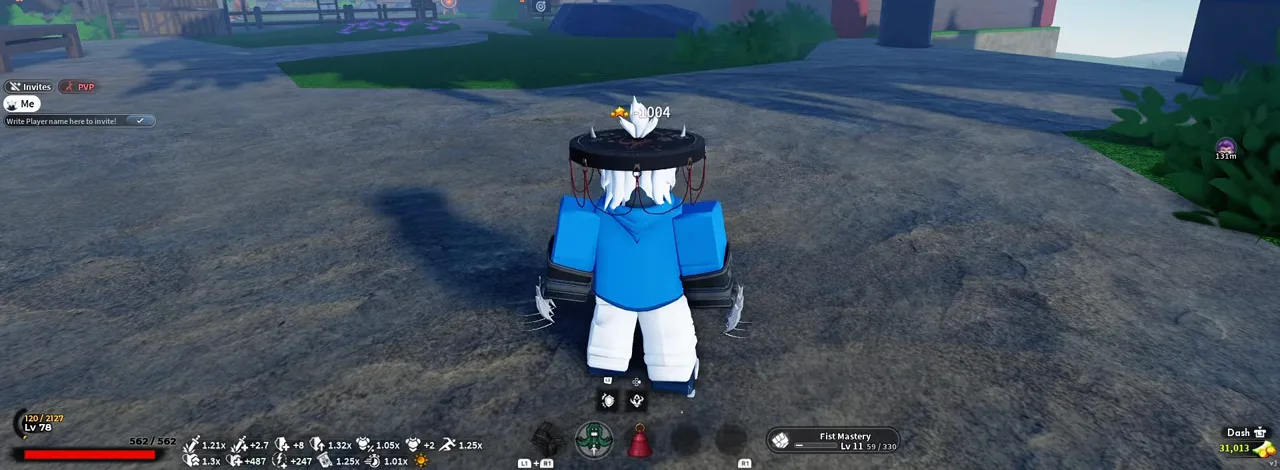
Bottom right, Dash with a stick-press icon; the hotbar carries L1 + R1 and R1 badges. The creator's pasted controller diagrams are cropped off.
Frame at 5:40 of IN-DEPTH CONSOLE SUPPORT GUIDE and important tips and settings to change in PROJECT SLAYERS 2, recorded by LiftedTIO — a player’s video, not an official image
Mobile
Phones get a third Settings tab, Mobile, with a Button size slider for the on-screen controls; shrink them if they cover the joystick or the quest box. If the boss health bar takes up half the screen, the Boss bar switch in the General tab may help, though nobody has reported trying it. Double taps that did not register were fixed in V0.135.
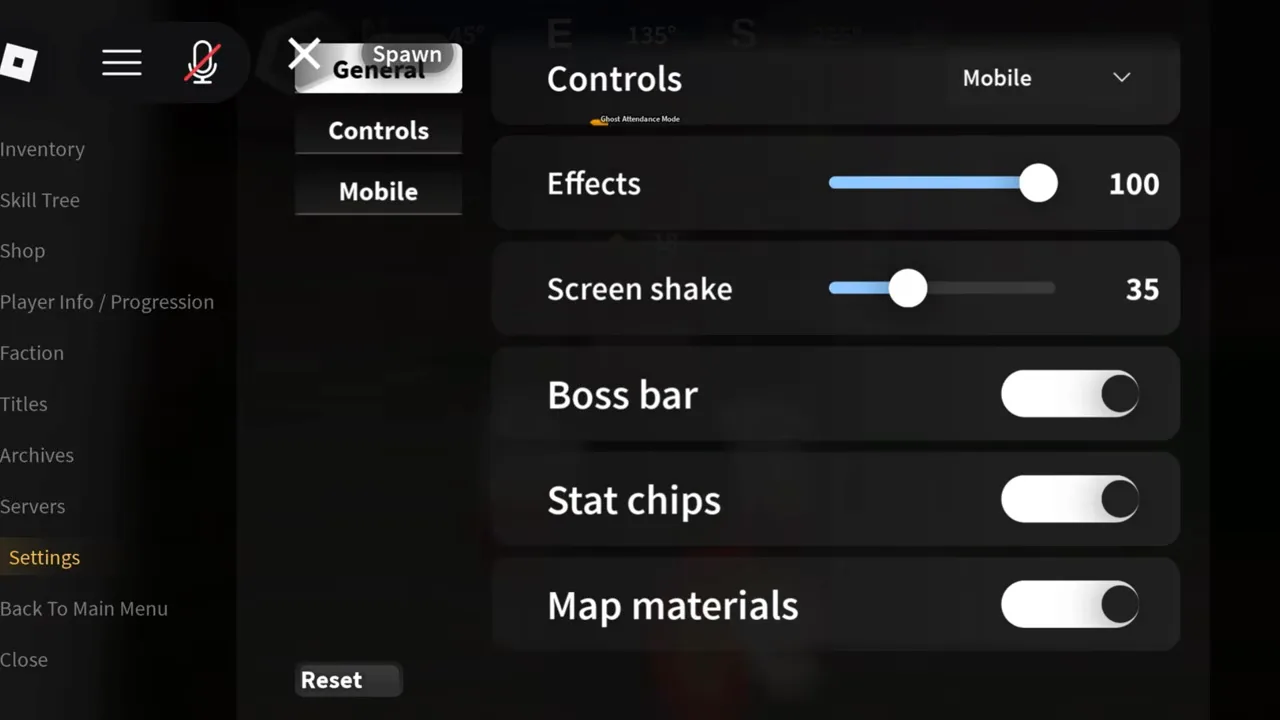
On mobile: Controls Mobile, Screen shake 35, and two switches the first-week PC screen did not have, Boss bar and Stat chips. A third tab, Mobile, sits under Controls.
Frame at 18:51 of The ULTIMATE Project Slayers 2 MOBILE Guide! (Level 1-225), recorded by Madness — a player’s video, not an official image
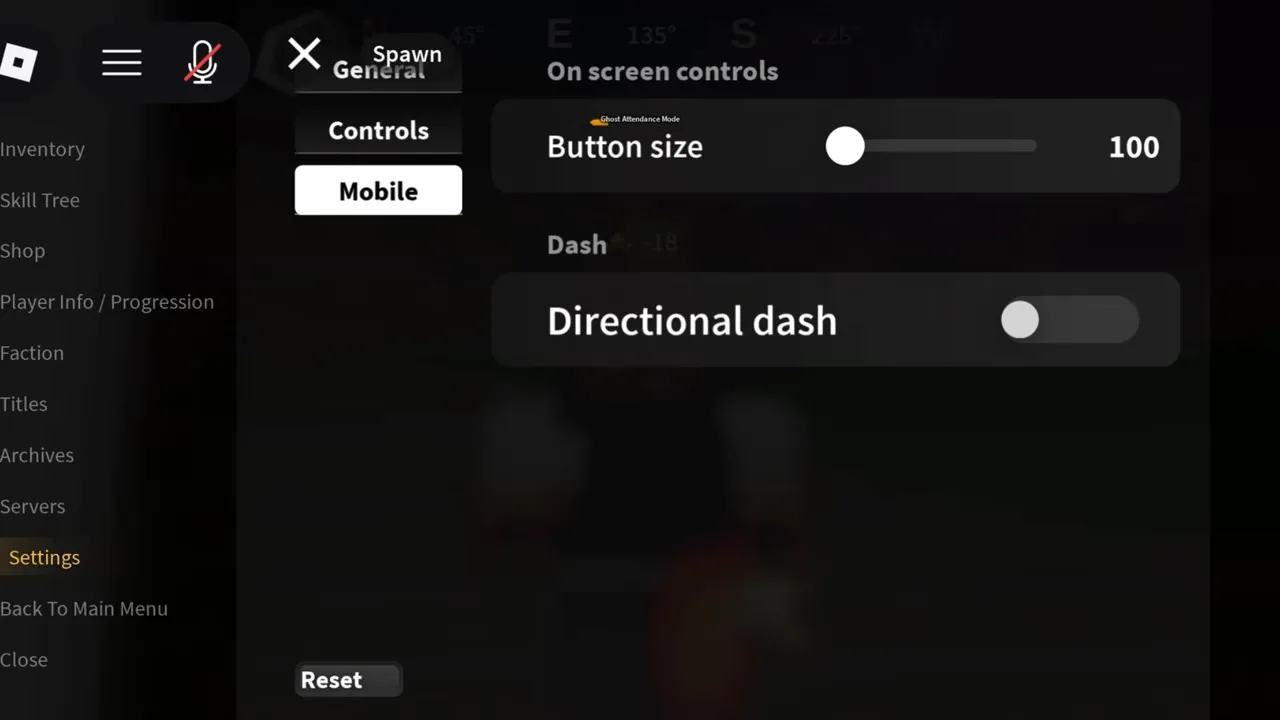
Mobile: On screen controls Button size 100, and Directional dash (off here).
Frame at 19:00 of The ULTIMATE Project Slayers 2 MOBILE Guide! (Level 1-225), recorded by Madness — a player’s video, not an official image
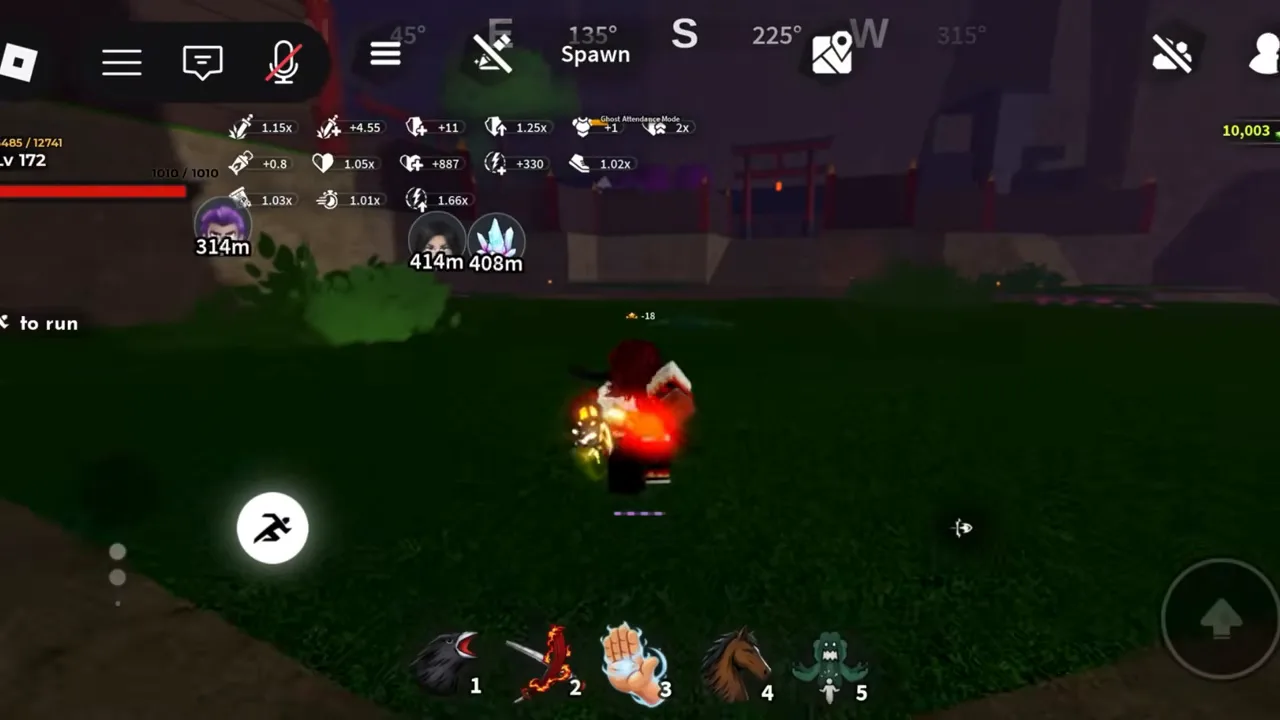
The phone HUD: a run button with its to run hint, the hotbar 1 to 5, a jump button, and unlabelled icons along the top.
Frame at 19:26 of The ULTIMATE Project Slayers 2 MOBILE Guide! (Level 1-225), recorded by Madness — a player’s video, not an official image
Known bugs and what helps
Everyone, NPCs included, turns into grey blocks
In the character customisation, pick facial accessory 26, then rejoin. The player who posted it says any other may work too.
Two other players said it worked
Shift lock drops out mid-fight, or when you toggle run
One player fixed it by setting Controls to PC in Settings; another traced a friend's case to a plugged-in controller, but the first player said that tip did not work for them. Neither has been confirmed by anyone else.
Two players report it; no fix confirmed
Left Alt, the shift lock key, also takes screenshots or unequips your weapon
Rebind Shift lock in the Controls tab. One player uses Left Control.
The rebind exists on screen
On a controller, dash only goes forward
Turn on Directional dash in the Controls tab (in the Mobile tab on a phone).
The switch is on screen; two players point to it
E opens a 600 Robux emote pass prompt
Since V0.18 the emote wheel has its own key. Move it off E in the Controls tab.
In the developer's V0.18 notes
Ouwigahara: after a death you land outside the map and cannot move or type
Reset a few times; one player says it sometimes puts you back. Otherwise leave the game. Since V0.18 your banked milestone chests come back when you return.
Six players reported it in the first week; no fix announced · more on the ouwigahara page
Invisible spikes in the parkour on mobile and console
The developer's V0.98 notes list a fix. One player suggests changing graphics settings if it comes back.
Fixed in V0.98; the notes do not say which parkour
On a phone, the boss health bar covers half the screen
Settings, General tab: switch off Boss bar. Whether that fixes this exact complaint has not been tested.
The switch is on screen
On a phone, buttons are too big or sit on the joystick
Settings, Mobile tab: Button size.
On screen and in the game's description
On console you cannot change hair or outfit colours
Do the customisation on a phone, or plug a mouse into the console.
Two players report it; the workarounds are one player each
Final Selection says the place is restricted when you teleport from a private server
None posted yet.
One player
Fixes in the developer’s notes
Ouw Productions posts change-logs in its Discord. The ones creators have put on screen fixed these control and bug issues:
- V0.98: invisible spikes in the parkour on mobile and console, a possible fix for fish that fell to the ground, and the Sickles schematic some players could not get.
- V0.135: mobile double taps, the parkour dungeon’s performance, and reduced point gain in Ouwigahara.
- V0.15: the Yeti teleporting above its cave.
- V0.18: blocking after moving Skill 1 off F, bosses vanishing when they kill you, Ouwigahara lag in long runs, a Sealed Chest stuck in a wall, Baitmonger Nori refusing to sell Worms, and being dragged off a shrine with a fishing rod out, per the notes Scuby pasted.
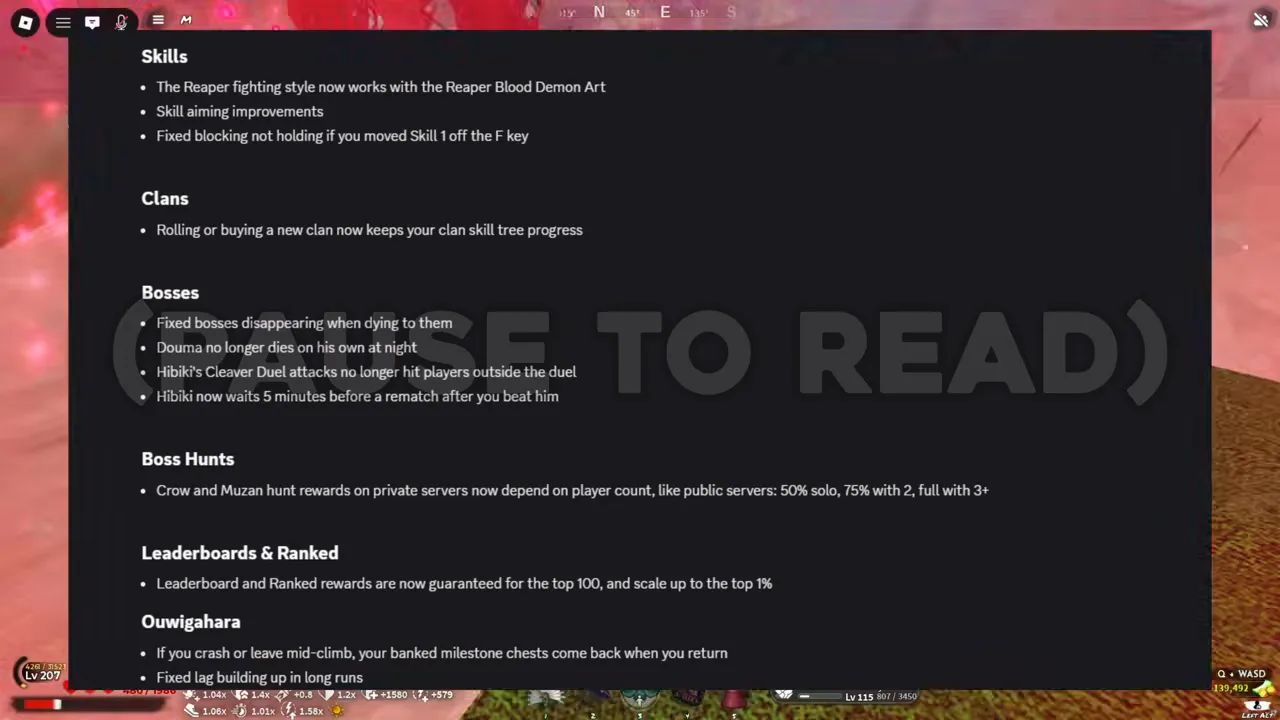
V0.18, pasted by the creator: Fixed blocking not holding if you moved Skill 1 off the F key, the boss hunt rates on private servers, and If you crash or leave mid-climb, your banked milestone chests come back when you return.
Frame at 4:03 of The ENTIRE META Just CHANGED! | Project Slayers 2, recorded by Scuby — a player’s video, not an official image
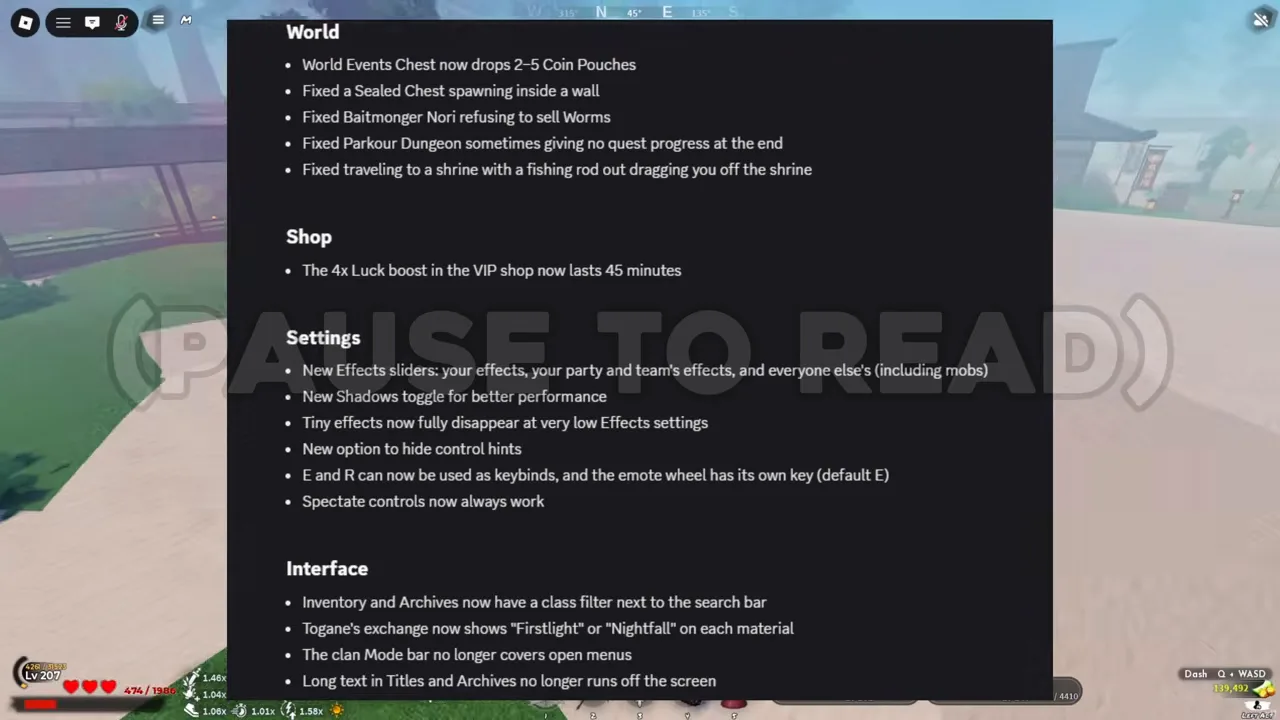
V0.18's Settings section: new Effects sliders, a Shadows toggle, an option to hide control hints, and E and R can now be used as keybinds, and the emote wheel has its own key (default E).
Frame at 4:07 of The ENTIRE META Just CHANGED! | Project Slayers 2, recorded by Scuby — a player’s video, not an official image
The balance changes in the same posts are on the update log.
Watch the console setup
IN-DEPTH CONSOLE SUPPORT GUIDE and important tips and settings to change in PROJECT SLAYERS 2
Recorded by LiftedTIO on YouTube, a player’s video, not an official one
Every controller bind, the aim and dash settings rows, and a list of console bugs.